Source Distribution in Control Rooms: HDMI Matrix Guide
Source Distribution in a Control Room: How Any Source Reaches Any Screen in Under a Second
توزيع المصادر في غرفة التحكم: كيف يصل أي مصدر إلى أي شاشة في أقل من ثانية
In a control room, the question that decides whether the system works is not "how many screens?" It is: what happens when the operator needs a specific source on a specific region of the wall, right now?If the answer is "unplug one cable and plug in another," what you have is a set of displays, not a control room. If the answer is "one tap on a tablet and the image moves instantly," you are looking at a distribution system that was designed and programmed properly.This article explains how that system is built: the difference between three devices people routinely confuse, what to look for in a specification, and the limits of common solutions — drawing on a project we recently delivered comprising seven identical control rooms and 84 panels in total.
في غرفة التحكم، السؤال الذي يحسم نجاح النظام ليس «كم شاشة؟» بل: ماذا يحدث حين يحتاج المشغّل مصدرًا بعينه على منطقة بعينها من الجدار الآن؟إن كان الجواب «نفصل كابلًا ونوصّل آخر»، فما لديك مجموعة شاشات لا غرفة تحكم. وإن كان الجواب «ضغطة واحدة على جهاز لوحي والصورة تنتقل فورًا»، فأنت أمام منظومة توزيع مصمَّمة ومبرمَجة كما ينبغي.في هذا المقال نشرح كيف تُبنى هذه المنظومة: الفرق بين الأجهزة الثلاثة التي يخلط بينها كثيرون، وما الذي يجب أن تبحث عنه في المواصفة، وما حدود الحلول الشائعة — مستندين إلى مشروع نفّذناه مؤخرًا من سبع غرف تحكم متطابقة بإجمالي 84 شاشة.
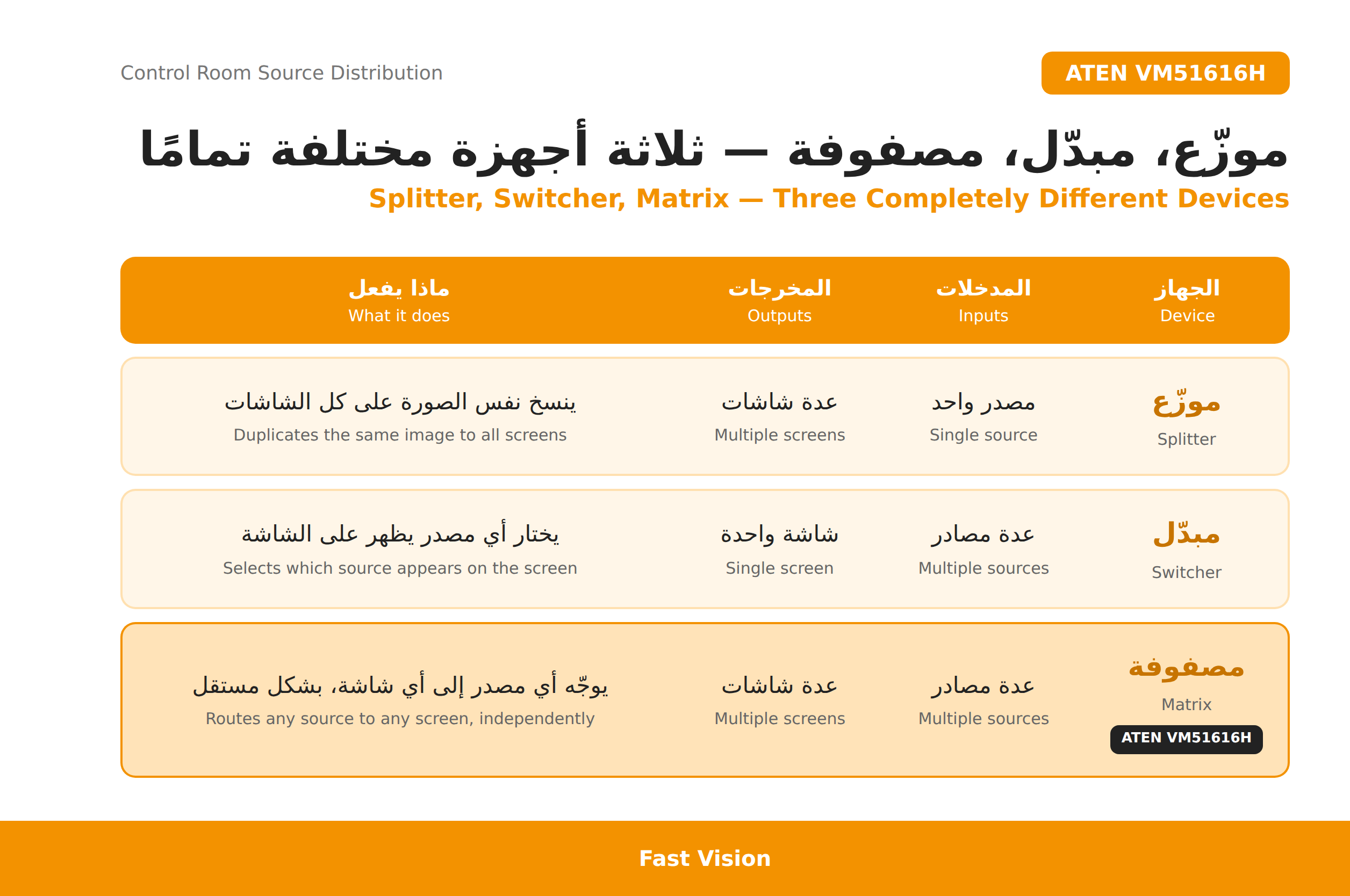
The practical rule: if each display must show different content, and that routing must change during operation, only a matrix will do. Splitters and switchers solve much simpler problems at a fraction of the cost — and there is no reason to pay for a matrix where one is not needed.
القاعدة العملية: إذا كان المطلوب أن تعرض كل شاشة محتوى مختلفًا، وأن يتغيّر هذا التوزيع أثناء التشغيل، فلا بديل عن المصفوفة. أما الموزّع والمبدّل فيحلّان مسائل أبسط بكثير وبتكلفة أقل بكثير — ولا داعي لدفع ثمن مصفوفة في مكان لا يحتاجها.
Three characteristics that decide the choice
ثلاث خصائص تحسم اختيار المصفوفة
Any matrix brochure lists many features. Only three determine whether the system works in a real control room:
البنود التي تظهر في بروشور أي مصفوفة كثيرة. ثلاثة منها فقط تحدّد نجاح النظام في غرفة تحكم فعلية:
1. A built-in scaler
Control-room sources are mixed-resolution by nature: operational workstations, camera recorders, several monitoring systems, each with a different output.Without a scaler, every switch triggers a renegotiation between source and display — two or three seconds of black screen, and sometimes no image at all. A built-in scaler fixes the output resolution and that behaviour disappears entirely.This single item separates a matrix that belongs in a control room from one that does not.
1. مقياس الصورة المدمج (Scaler)
مصادر غرفة التحكم مختلطة الدقّات بطبيعتها: حواسب تشغيل، ومسجّلات كاميرات، وأنظمة مراقبة متعدّدة، وكل منها يخرج بدقة مختلفة.بدون Scaler، كل عملية تبديل تعني إعادة تفاوض بين المصدر والشاشة حول الدقة — فشاشة سوداء لثانيتين أو ثلاث، وأحيانًا صورة لا تظهر إطلاقًا. المقياس المدمج يثبّت دقة الخرج فيختفي هذا السلوك كليًا.هذا البند وحده يفصل بين مصفوفة صالحة لغرفة تحكم وأخرى غير صالحة.
2. Seamless switching
Conventional systems blank the output on every switch. In an operations room monitoring live events that blink is unacceptable — not because it looks bad, but because two seconds of black at the wrong moment means losing track of something.
2. التبديل السلس (Seamless Switching)
في النظام التقليدي يومض الخرج عند كل تبديل. في غرفة عمليات تُراقَب فيها أحداث جارية، هذا الوميض غير مقبول — ليس لأنه قبيح بل لأن ثانيتين من الشاشة السوداء في اللحظة الخطأ تعني فقدان متابعة.
3. EDID management
A source reads the display's capabilities before sending an image. In a matrix the target display keeps changing, so the source reconfigures itself on every route change. EDID management gives the source one consistent picture of what is expected of it and breaks that cycle.From the field: most "black screen" reports in matrix systems are not device failures but a misunderstanding between source and display about capabilities. EDID is the first thing we check, not the last.
3. إدارة EDID
جهاز المصدر يقرأ قدرات الشاشة قبل أن يرسل الصورة. في المصفوفة تتغيّر الشاشة المستهدفة باستمرار، فيعيد المصدر ضبط نفسه مع كل تحويل. إدارة EDID تعطي المصدر صورة ثابتة عمّا يُتوقّع منه، فتتوقف هذه الدورة.معلومة من الميدان: معظم بلاغات «الشاشة سوداء» في أنظمة المصفوفات ليست عطلًا في الجهاز، بل سوء تفاهم بين المصدر والشاشة حول القدرات. EDID هو أول ما نراجعه، لا آخره.
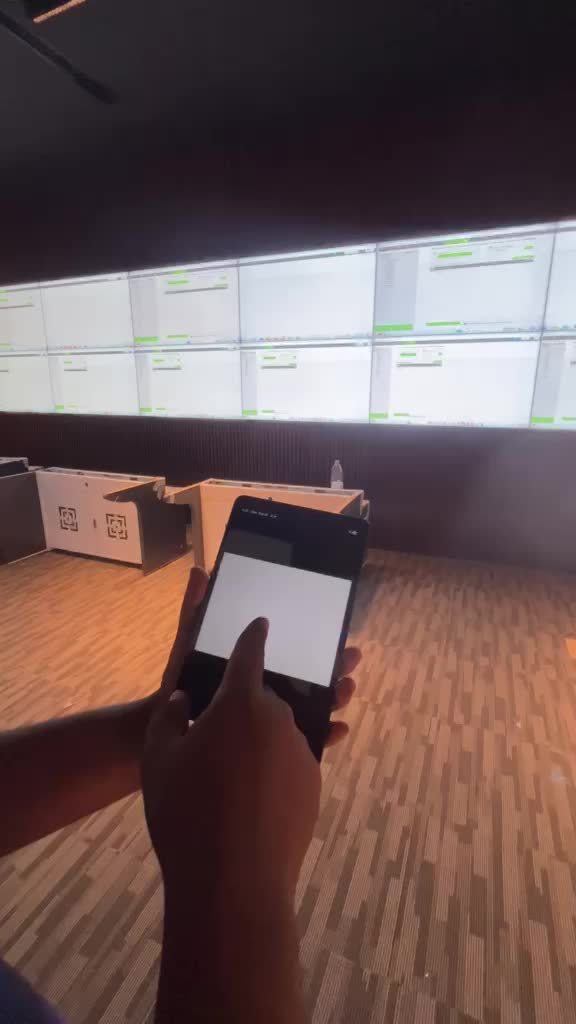
The accompanying clip was filmed at one of the sites during testing and shows live switching from the tablet — content moves between wall regions with no interruption and no black frame between states.
المقطع المرفق مصوّر في أحد المواقع أثناء الاختبار، ويُظهر التبديل الحيّ من الجهاز اللوحي — لاحظ انتقال المحتوى بين مناطق الجدار دون انقطاع ودون إطار أسود بين حالة وأخرى.
Checklist before approving any matrix
- How many sources today, and how many will you add within three years?
- What is the highest resolution required on any output — 1080p or 4K?
- Do any sources carry protected content requiring HDCP 2.2?
- What is the longest cable run from cabinet to the furthest display?
- Does the operator need uninterrupted switching, or is a half-second blink acceptable?
- How many fixed operating scenarios will be saved as presets?
- Who controls it, from which device, over which network?
- Is a spare panel supplied on site, or will you wait on a shipment at the first failure?
قائمة تحقّق قبل اعتماد أي مصفوفة
- كم مصدرًا فعليًا اليوم، وكم ستضيف خلال ثلاث سنوات؟
- ما أعلى دقة مطلوبة على أي مخرج — 1080p أم 4K؟
- هل من بين المصادر محتوى محمي يتطلب HDCP 2.2؟
- ما أطول مسار كابل من الخزانة إلى أبعد شاشة؟
- هل يحتاج المشغّل تبديلًا دون انقطاع، أم أن وميض نصف ثانية مقبول؟
- كم سيناريو تشغيل ثابتًا سيُحفظ كملف إعدادات؟
- من يتحكم، ومن أي جهاز، وعبر أي شبكة؟
- هل تُورَّد شاشة احتياطية في الموقع، أم يُنتظر الشحن عند أول عطل؟
أسئلة متكررة | FAQ
What is the difference between a video matrix and a video wall processor?A matrix routes a whole source to a whole output. A video wall processor spreads one image across several displays or shows several windows within one display. Some matrices — including the model used on this project — partially cover both through their video wall layouts.
ما الفرق بين مصفوفة الفيديو ومعالج جدار الفيديو؟المصفوفة توجّه مصدرًا كاملًا إلى مخرج كامل. ومعالج الشاشات الجدارية يقسّم الصورة الواحدة على عدة شاشات أو يعرض عدة نوافذ داخل شاشة واحدة. بعض المصفوفات — ومنها الموديل المستخدم في هذا المشروع — تجمع بين الوظيفتين جزئيًا عبر دعمها لتخطيطات جدار العرض.
How many displays can a 16×16 matrix drive?Up to sixteen. On this project twelve outputs were used per room, with four left as expansion headroom.
كم شاشة يمكن ربطها بمصفوفة 16×16؟حتى ستة عشر شاشة. في هذا المشروع استُخدم اثنا عشر مخرجًا لكل غرفة، وتُركت أربعة مخارج كهامش توسّع.
Can the matrix be controlled from a tablet?Yes. Control is available through a web GUI and a mobile or tablet app, in addition to the front panel, RS-232 and Telnet.
هل يمكن التحكم بالمصفوفة من جهاز لوحي؟نعم. التحكم متاح عبر واجهة ويب وتطبيق على الجوال أو الجهاز اللوحي، إضافة إلى اللوحة الأمامية ومنفذ RS-232 و
What panel brightness suits a control room?Control rooms are light-controlled environments, and 500 nits is entirely sufficient and comfortable for continuous viewing. High brightness is needed for façades and naturally lit spaces, not here.
Telnet.ما سطوع الشاشة المناسب لغرفة التحكم؟غرف التحكم بيئات مضبوطة الإضاءة، و500 nits كافية تمامًا ومريحة للعين في التشغيل المتواصل. السطوع المرتفع مطلوب في الواجهات والأماكن المضاءة طبيعيًا، لا هنا.ل
Why supply a spare panel with a video wall?Because a failed display in a tiled wall is a black gap in the middle of the picture, and an overseas shipment means weeks. An on-site spare cuts repair to hours and guarantees colour match, coming from the same production batch.
لماذا تُورَّد شاشة احتياطية مع الشاشات الجدارية؟لأن الشاشة المعطّلة في جدار متصل فجوة سوداء وسط الصورة، وانتظار شحنة خارجية يعني أسابيع. الشاشة الاحتياطية تختصر الإصلاح إلى ساعات وتضمن تطابق اللون لأنها من نفس دفعة الإنتاج.
What is the first thing to check when a screen goes black?EDID configuration. Most such reports are not device failures but a misunderstanding between source and display about capabilities.
ما أول ما يُراجَع عند ظهور شاشة سوداء؟إعدادات EDID. معظم هذه البلاغات ليست عطلًا في الجهاز بل سوء تفاهم بين المصدر والشاشة حول القدرات.
We design the system before we price it
نصمّم النظام قبل أن نسعّره
We design and deliver complete control rooms and operations centres: display walls, source distribution and control, infrastructure and cabinets, programming, training and maintenance — in Riyadh and across the Kingdom.
Send us the source and display counts per room, the number of sites, the highest resolution required, and the longest cable run, and we will return a proposed connection diagram and an equipment list with specifications traceable to manufacturer datasheets — before any pricing.
نصمّم وننفّذ غرف التحكم ومراكز العمليات بالكامل: الشاشات الجدارية، وتوزيع المصادر والتحكم، والبنية والخزانات، والبرمجة والتدريب والصيانة — في الرياض وفي مناطق المملكة.
أرسل لنا عدد المصادر والشاشات لكل غرفة، وعدد المواقع، وأعلى دقة مطلوبة، وأطول مسافة كابل، ونعيد لك مخطط اتصال مقترحًا وقائمة تجهيزات بمواصفات منسوبة إلى داتاشيت المصنّع — قبل أي عرض سعر.