DISCAS standard
Case study: How to prove that the screen size is correct — DISCAS standard
Is 130" the Right Size for a 6 × 10 m Room? Answering With Arithmetic, Not Estimation — Applying the DISCAS Standard
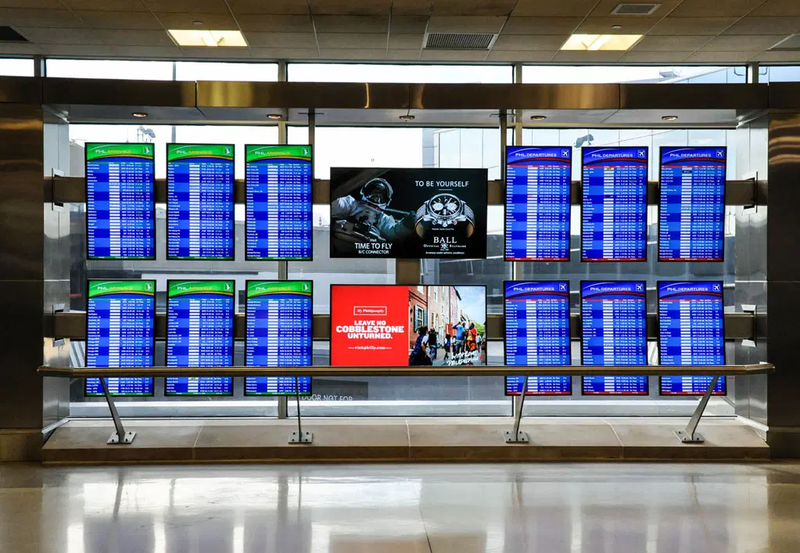
The Problem
A client at a government ministry came to us with a question that comes up on almost every meeting room project: the room measures 6 × 10 metres and the proposed display is 130", so is that the correct size? Or will it overwhelm the people seated at the front, or be too small for anyone reading from the back? The usual answer to this is "it looks about right." That is not how we work. This is a government purchase, documented against a specification, and the decision cannot rest on a sales engineer's visual impression.
The Method: The DISCAS Standard
We applied DISCAS, an international standard for determining display size from room dimensions and content type. The principle is straightforward: the maximum distance at which content remains clearly legible is calculated from the height of the image — not from the diagonal — multiplied by a factor that changes with the type of content shown. The factor varies because the eye does not need the same level of detail from every kind of content:


The Calculation
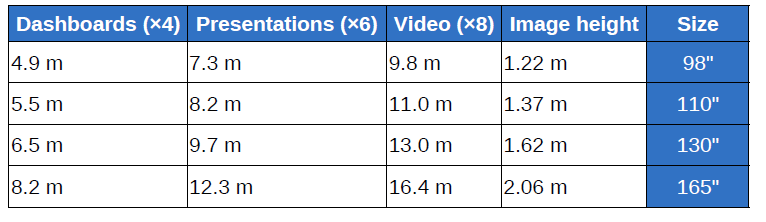
Step one: establish the image height. A 130" 16:9 display has an image height of approximately 1.6 metres — the 130" diagonal itself is never used directly in the calculation, and that is the first point most people get wrong. Step two: multiply the height by the content factor:
The Outcome
The 130" display is correct for this room, and the answer is now backed by a number rather than an impression. For presentations and video — the primary content in ministry meeting rooms — the display covers the full depth of the room including the last seat. More usefully, the method did not simply answer yes. It defined the limits of use: if part of the work involves dense numerical dashboards, the comfortable reading zone extends to 6.4 metres — which is exactly where the seats around the meeting table sit. Anyone at the rear wall will read presentations and video clearly and may need a larger typeface on a dashboard. That difference between "the display is suitable" and "the display is suitable to this distance for this content" is what prevents the most common complaint after a room is handed over: a size that is correct on paper and content nobody can read from the back. Read the table backwards when planning: start from the distance to the furthest seat and the content type used most often, then pick the size that covers both — not the other way round. Reference Table — the Standard Applied to Common Sizes


Key Takeaway
Choosing a display size is not a matter of taste or budget headroom. It is a calculation with three inputs: image height, content type, and the furthest viewing distance. And when the decision rests on a recognised standard, the client gets something more valuable than the recommendation itself — the ability to justify the decision to a procurement committee and a specification review. At Fast Vision we run this calculation for every room before proposing a size. The difference between an estimated size and a calculated one does not show on handover day. It shows at the first meeting where somebody sits in the back row.
Get in Touch
Fast Vision is a communications and IT solutions provider based in Riyadh, Saudi Arabia. To determine the right size for your room with a documented calculation before you buy, send us the room dimensions and content type and we will provide the recommendation along with the equation behind it.